Wondering how to fix phone speaker problems? A phone speaker can fail in many different ways. Sometimes there is no sound at all, sometimes the audio turns muffled after the phone gets wet, and sometimes you hear crackling that was not there last week.
The good news is that most speaker problems are not hardware failures. In our experience running speaker repair tools used by thousands of people every day, the majority of cases are solved by a settings change, a software fix, or a proper cleaning.
This guide walks you through 9 fixes in the right order, starting with the quickest checks and ending with the point where professional repair becomes the sensible choice. It covers both iPhone and Android.
First, Diagnose the Problem
Thirty seconds of diagnosis saves you from trying fixes you do not need. Answer these three questions before you start:
- Is it one speaker or all sound? Most phones have two sound outputs: the earpiece you hold to your ear during calls and the loudspeaker at the bottom. If callers sound fine but music is silent, only the loudspeaker is affected. If everything is silent, the cause is more likely software or settings. You can confirm which channel is failing in seconds with our free speaker sound test. If the problem is that callers cannot hear you, test the input side with our microphone test.
- Is it one app or every app? Play sound from two or three different apps (a music app, YouTube, the ringtone preview in Settings). If only one app is silent, the problem is that app’s own volume or notification settings, not your speaker.
- Did anything happen right before? Water exposure, a drop, a software update or a new app are all strong clues that point you directly to the matching fix below.
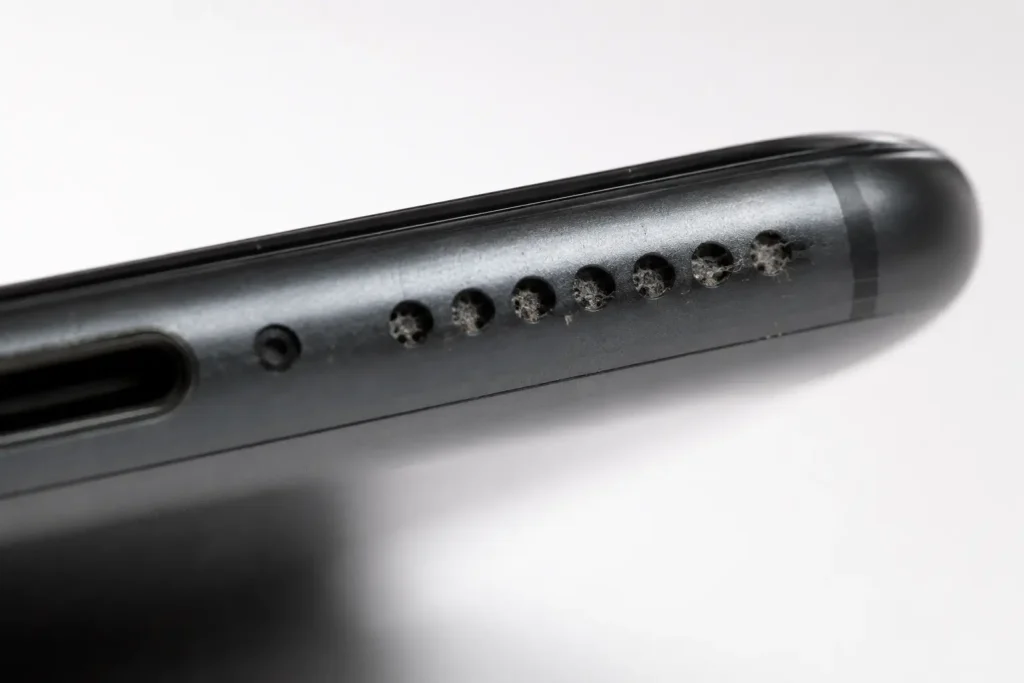
This quick table matches the most common symptoms to their usual cause:
| Symptom | Most likely cause | Start with |
|---|---|---|
| No sound at all, everywhere | Silent mode, volume, Bluetooth routing | Fixes 1–3 |
| Muffled sound after the phone got wet | Water trapped in the speaker | Fix 5 |
| Gradually quieter or duller over months | Dust and lint in the speaker grill | Fix 6 |
| Crackling or distortion at high volume | Debris on the speaker, or hardware wear | Fixes 5–6, then 9 |
| Silent only in one app | App settings | Fix 7 |
| Started right after an update | Software bug | Fixes 4 and 8 |
Fix 1: Check Volume and Silent Mode
It sounds too obvious to mention, yet it is the single most common cause of a “broken” speaker. Phones manage several separate volume levels, and the one you adjust with the side buttons is not always the one that matters.
On iPhone: Check the Ring/Silent switch on the left edge (or the Action button on newer models). Orange means silent. Then open Settings > Sounds & Haptics and check the Ringtone and Alerts slider, because it can be set independently from media volume. While media is playing, press the volume buttons to raise media volume specifically.
On Android: Press a volume button, then tap the small settings or three-dot icon that appears. You will see separate sliders for Media, Call, Ring and Alarm. Media volume is the one that controls music and video, and it is frequently at zero even when ring volume is at maximum.
For persistent volume problems, see our phone volume troubleshooting guide.
Fix 2: Turn Off Do Not Disturb and Focus Modes
Do Not Disturb (called Focus on iPhone) silences notifications and ringtones, and depending on its configuration it can make the phone feel completely mute. On iPhone, swipe into Control Center and check whether any Focus mode is active. On Android, swipe down the quick settings panel and look for the Do Not Disturb icon. Turn it off and test the sound again. Also check scheduled modes: many people set Do Not Disturb to turn on automatically at night and forget it is still active in the morning.
Fix 3: Disconnect Bluetooth Devices
If your phone is paired with wireless earbuds, a car stereo or a smart speaker, your audio is being routed there instead of the phone’s own speaker. This is one of the sneakiest causes because the phone behaves as if everything is fine, just somewhere else. Turn Bluetooth off completely from quick settings, then play a song. If the sound comes back, you have found your answer. Earbuds left in a pocket or a bag in pairing range cause this constantly, and some cars keep the connection alive even when the engine is off.
Fix 4: Restart Your Phone
A restart clears stuck audio processes and routing bugs that build up over weeks of uptime. It takes one minute and fixes a surprising share of sound problems, especially ones that appear randomly after an app misbehaves. Hold the power button (on iPhone, power plus a volume button), restart the device and test the speaker before opening anything else.
Fix 5: Remove Water from the Speaker
If your phone got wet and the speaker now sounds muffled, quiet or underwater-like, the cause is almost certainly water sitting inside the speaker chamber. Water dampens the speaker membrane so it cannot vibrate freely. Even water-resistant phones suffer from this, because resistance keeps water out of the electronics but not out of the open speaker cavity.
The most effective home remedy is the same one Apple built into the Apple Watch: playing a specific low-frequency tone that vibrates the speaker hard enough to physically push the water out. Our free fix my speaker tool automates this with a three-stage cleaning protocol. Turn your volume to maximum, point the speaker downward so gravity helps, and run the full cycle. You may see tiny droplets being ejected from the grill. Repeat the cycle if the sound improves but is not fully clear yet.
Two warnings while we are here. Do not put the phone in rice: it absorbs surface moisture at best, does nothing for water inside the speaker, and rice dust can get into the ports. Do not use a hair dryer either, since heat can warp the speaker membrane and push moisture deeper into the device. If you want a passive drying method, silica gel packets in a closed container for 24 to 48 hours are far more effective than rice.
For device-specific steps, see how to get water out of an Android phone speaker.
Fix 6: Clean Dust and Lint from the Speaker Grill
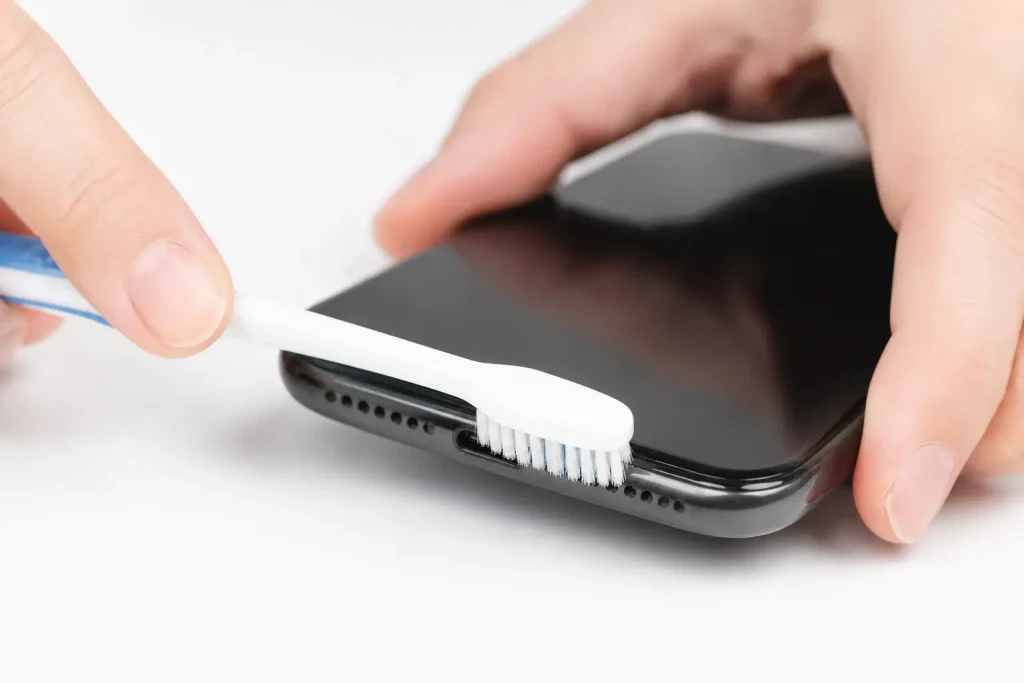
Speakers that have grown quieter and duller over months rather than overnight usually suffer from dust. Pockets, bags and bedsheets feed a steady supply of lint into the speaker grill until the holes physically clog. There are two ways to attack this, and they work best combined:
- Sound-based cleaning: The same vibration technique that ejects water also shakes dust loose. Our speaker cleaner tool runs multiple frequency cycles designed for exactly this. Run it first so the vibrations bring trapped particles up to the surface.
- Gentle physical cleaning: Brush across the grill with a soft, dry toothbrush or a clean paintbrush. Then press a piece of adhesive tape or sticky tack lightly against the grill and peel it away; it lifts out the loosened lint. Never insert pins, toothpicks or needles into the holes, and avoid blowing compressed air directly into the speaker at close range, since both can tear the mesh or damage the membrane.
Have the same problem on a laptop? See how to remove dust from laptop speakers. iPhone owners can follow the iPhone-specific cleaning routine, which also covers what Apple officially allows on the mesh.
Fix 7: Check App Settings and Test in Safe Mode
When only one app is silent, open that app’s own settings and look for a mute or volume option; games and social apps very often have independent sound toggles. Also check the app’s notification settings in your phone’s Settings menu.
If sound problems are wider but you suspect an app is interfering, Android offers Safe Mode: hold the power button, then long-press the Restart option and confirm Safe Mode. The phone boots with only system apps. If the speaker works perfectly there, a third-party app is the culprit; uninstall recently added apps one by one until the problem disappears. iPhones have no Safe Mode, but closing all background apps and testing after a restart serves a similar purpose.
Fix 8: Update Software and Reset Sound Settings
Audio bugs ship with system updates more often than manufacturers would like to admit, and they usually get patched quickly. Check Settings > General > Software Update on iPhone or Settings > System > System Update on Android and install anything pending. Both Apple Support and Google’s Android Help also maintain official sound troubleshooting guides for model-specific quirks.
If the problem started after an update and persists, reset the settings layer without erasing your data. On iPhone: Settings > General > Transfer or Reset iPhone > Reset > Reset All Settings. On Android: Settings > System > Reset options > Reset app preferences (and on some models, a separate reset for Wi-Fi, mobile and Bluetooth). Your photos and apps stay; only preferences return to defaults. A factory reset is the nuclear option and only worth trying if you strongly suspect software and everything else has failed. Back up first.
Fix 9: Know When It Is a Hardware Problem
If you have worked through everything above and the speaker still fails, the hardware itself may be damaged. The telltale signs: crackling that persists at every volume level even after cleaning, a speaker that died immediately after a hard drop, no improvement at all after water ejection on a phone that took a serious soaking, or rattling sounds from a torn membrane.
Speaker replacement is one of the cheapest and fastest repairs a phone shop performs, typically far cheaper than screen or battery work, and usually done the same day. If your phone is under warranty or covered by AppleCare or a manufacturer protection plan, check that route first, though note that liquid damage is excluded from standard warranties. Whatever you do, stop running the speaker at maximum volume in the meantime, because a damaged membrane deteriorates faster under load.
Preventing Speaker Problems
A little routine care keeps you from needing this guide again. Brush the speaker grill gently every few weeks before lint can compact. Keep the phone out of bathrooms during hot showers, since steam condenses inside the speaker cavity just like a dunk in water would, only slower.
If your phone does get wet, run a water ejection cycle immediately even if the sound seems fine, because expelling moisture early prevents the corrosion that develops over the following days. And if you are frequently around water, a case with port covers costs little compared to a speaker replacement.
Frequently Asked Questions
Why does my phone speaker sound muffled?
The two dominant causes are water trapped in the speaker chamber after the phone got wet, and dust or lint clogging the speaker grill over time. Water muffling appears suddenly; dust muffling builds gradually. Both respond well to sound-based cleaning, which vibrates the obstruction out of the speaker.
Can I fix a phone speaker without opening the phone?
In most cases, yes. Settings problems, software bugs, water and dust, which together cause the large majority of speaker complaints, are all fixable without any disassembly. Opening the phone is only necessary when the speaker hardware itself has failed, and that job is best left to a repair shop.
Does the rice trick work for a wet phone speaker?
Not really. Rice absorbs some surface moisture but cannot pull water out of the speaker cavity, and it introduces starch dust into ports. Sound-based water ejection works in seconds and targets the exact spot where the water sits. For passive drying of the whole device, silica gel packets outperform rice by a wide margin.
How do I know if my speaker problem is hardware?
Run through the software checks (volume, Do Not Disturb, Bluetooth, restart) and clean the speaker with sound and a soft brush. If crackling or silence persists after all of that, especially following a drop or deep water exposure, the speaker component is likely damaged and needs replacement.
Is it safe to play loud cleaning tones through my speaker?
Yes. Cleaning tones are ordinary audio played at your device’s normal maximum volume, the same level loud music would reach. They are calibrated to vibrate the speaker membrane within its normal operating range, which is exactly how the Apple Watch water eject feature works.
How to Fix Phone Speaker Issues in the Right Order
Most “broken” phone speakers are nothing of the sort. The key to knowing how to fix phone speaker trouble is order: work from the cheap and fast fixes toward the expensive ones: settings first, then a restart, then water ejection and dust cleaning, then software resets, and only then the repair shop. Following that order, the large majority of readers will have their sound back within minutes.
If your phone took a swim recently, start with the water ejection tool right now; the sooner trapped water leaves the speaker, the lower the chance of lasting damage.